Supaviral Ads
How To Storyboard A Short-Form AI Video Ad
Plan a hook, a product moment, and a clear next step with an original three-shot storyboard you can adapt for your own campaign.
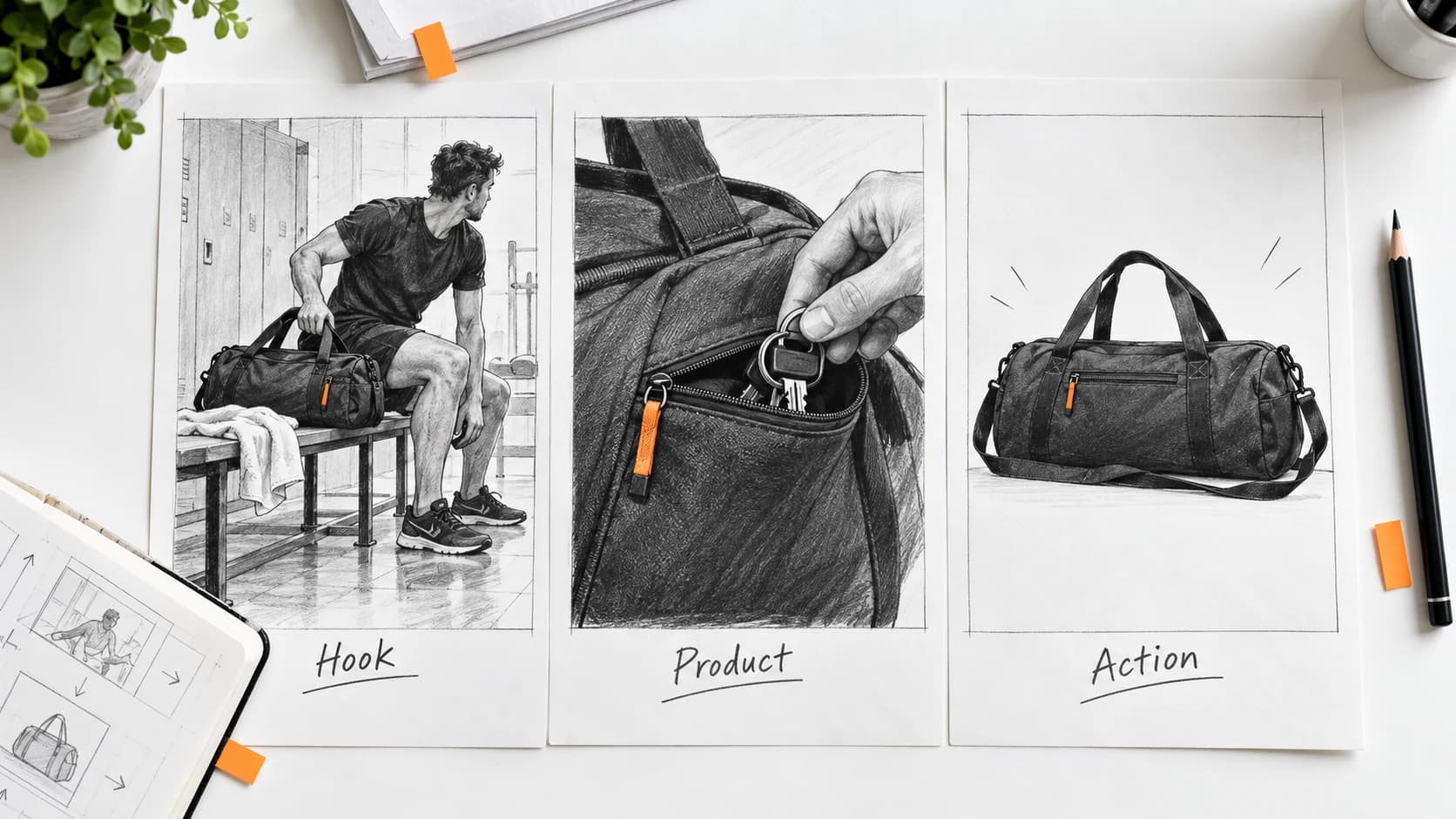
A storyboard makes each generation earn its place in the edit. Before creating video, decide what the viewer should understand in each shot. Here is an original planning exercise for a fictional gym bag with a separate key pocket.
Use A Simple Story Structure
TikTok’s Creative Codes recommends a hook, body, and close, alongside platform-native execution, vertical framing, attention to interface space, and purposeful sound. Its guidance is specific to TikTok and should be adapted to the placement you are making.
The three-shot plan below is our example of applying that structure. The timings are an editable creative brief, not a platform requirement or performance promise.
Shot One: Establish The Situation
For roughly the first three seconds, show the bag beside a bench as its owner prepares to leave. Add the caption “Keys always disappear after training?” during editing. The scene should communicate a recognizable situation without needing several fast hand movements.
Generate the scene as a standalone shot. Leave uncluttered space for the opening caption and avoid positioning the product where interface controls will cover it.
Shot Two: Show The Relevant Feature
Use a real close-up of the key pocket if its construction matters to the claim. The caption can say “A separate place for the small essentials,” provided the product actually has that feature. An AI scene can supply surrounding context, but an invented pocket is not a demonstration.
Plan the cut before generating supporting footage. If your reference does not show how the pocket opens, photograph it rather than expecting the model to infer the mechanism.
Shot Three: Give One Next Step
Finish with the real product and an approved logo. A call to action such as “Explore the bag” should lead to a page where the same product is easy to find. Avoid placing several competing offers on this frame.
Record a short voiceover or add licensed audio in your editor. Keep essential meaning in readable captions as well, so the story remains understandable when someone watches quietly.
Generate The Supporting Scene
Attach the approved bag reference to a compatible video model in Supaviral. This original prompt is for the opening context shot, not for a mechanical product demonstration.
Example Prompt
A gym bag matching the attached reference rests on a clean changing-room bench beside a folded towel. An adult athlete steps into frame and reaches toward the bag. Vertical composition, natural indoor light, one simple action, steady medium shot. Keep open space above the bench for a caption added later.
Review The Complete Edit
Export a draft and watch it on a phone. Check that each caption is readable, the feature shot supports the opening, and the closing frame gives the viewer enough time to understand the next step.
For your first comparison, change only the opening caption or situation. Keep the feature demonstration and closing offer stable, then record what the comparison teaches you.
Ready to try it? Open Supaviral Studio or explore the plans.